
CSS check
Sri Chinmoy Centre h2
Sri Chinmoy Centre h2 a
Sri Chinmoy Centre h3
Sri Chinmoy Centre h3 a
Sri Chinmoy Centre h4
Sri Chinmoy Centre h4 a
Sri Chinmoy Centre h5
Sri Chinmoy Centre h5 a
Numbered List
- Sri Chinmoy Centre
- Sri Chinmoy Centre
- Sri Chinmoy Centre
Bullet List (bold)
- Sri Chinmoy Centre
- Sri Chinmoy Centre
- Sri Chinmoy Centre
Modifying the Contact Form
One of the first things you will have to do in the new site is edit the contact form and possibly translate it into your language.
Editing the form
1. Login, go to your site, visit the contact form and Click on 'Edit'. You can change the greeting text on the contact form, and also the text that shows up when the visitor presses 'Submit'.

Changing Form Items
To configure the different items that appear at the top of the screen, press the Form components button, just below the View and Edit buttons at the top of the page. You will then see a list of all the existing fields.
The Mandatory option is whether to make a field compulsory (e.g. make it compulsory to leave telephone number). Mandatory fields will have a little red star beside them on the form.
As we are not emailing these requests, the Email option here is not used.

You can edit each of the form components by pressing Edit, and translate the titles into your language. Clone creates a copy of an existing form component.
Note: If you want to have a telephone field, edit the existing field rather than create a new one. The existing field has some special code to stop people putting email addresses in there instead of numbers.
Adding a new form component
Where it says New component name: Just add the title of the field (this is the title that site visitors will see)
Select the type of field: Text field is a single line, Text area is a bigger box - for addresses or messages. Then press add.
You can change the size of the text area/text field by filling in the width and height sections in the edit form.
Adding a new Contact Form
- If you have an old contact page for a certain city (e.g. /meditation/sydney/contact). You will want to delete this old Plone contact form as it will not work.
- At the moment there is one contact form for every country. If you need additional forms, contact a site administrator who will create a new contact form (Tejvan, Nirbhasa) Just say, which URL you would like it, e.g. /uk/contact/bristol. We hope to add option to create own contact forms shortly.
Note:
Note that when the site goes live, we will be moving away from checking our Centre mailbox for messages, and towards a system where country managers can view the contact form submissions by visiting the site. Among other things, this will make it easier to protect users from unwanted harassment.
Related
Video
Video of Contact form files/video/contact-form.screenflow/contact-form (not working at moment)
Help Pages
Editing pages:
- Adding/Editing pages in the new site
- Adding / Editing Images
- Uploading and linking to files
- Embedding Videos
Cleaning up the site:
Configuring the site (managers only):
- Adding items to the menu in the top menu bar
- Adding content to the sidebars
- Modifying the Contact Form
- Tips on using contact form
- Translating your site
News and events (Sri Chinmoy Races site only):
- News and Events Pages - what's different...
- Marking a page as 'news item'
- Marking a page as 'upcoming event'
- How to automatically display News and Events on front page using 'views'
- Importing race results from Excel/CSV into page
New concepts:
We've tried to make the site as familiar as possible for those of you who used the old Plone site. However, there are a few ideas in the new site, which we hope will make life simpler once you've gotten used to them:
1. Parent and child pages
About the Simple Book Structure of Drupal - easier to organise pages in the site
2. Blocks
By block, we mean an item you can put in the sidebar. (see: Putting Blocks in sidebar)
3. Dragging and Dropping
In the View/arrange pages, Edit top menu and Edit sidebars pages, you can see a 'drag and drop' icon (crossed arrows).
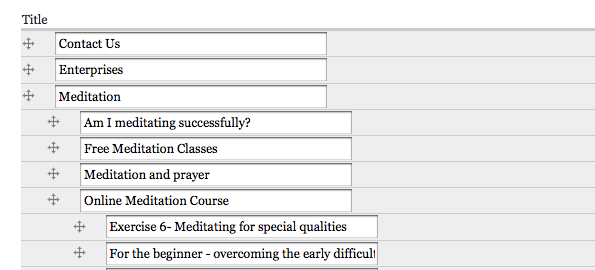
If you see that icon, it means you can drag and drop that particular item. Using drag and drop you can change the order of blocks in the left or sidebar, assign that block to a different region of the page, and change the order of the top menu links in the blue bar.
On the View/arrange pages, you can change the parent/child structure of the site by dragging a page to a different place in the site.
Note: for your changes to be saved, you have to press the save button.
Questions and Answers
- Setting URL path for a new page
Georgia Sri Chinmoy Centre
Welcome to Georgia Sri Chinmoy Centre
Contact the Sri Chinmoy Centre
Before sending a message, check if there are local contact details for a Sri Chinmoy Centre in your country (see the list below). If you don't see your country, then please use this form and we'll make sure it gets to the right person.
For copyright and media requests, you can also use this form.
Local contacts: Australia • Bangladesh বাংলাদেশ • Bosnia and Herzegovina • Brazil Brasil • Bulgaria България • Canada • Czech Republic Česko • Croatia Hrvatska • Estonia • France • Finland Suomi • Georgia საქართველო • Great Britain • Ghana • Greece Ελλάδα • Hungary • Iceland Ísland • India • Indonesia • Ireland • Italy Italia • Japan 日本 • Kenya • Macedonia • Mongolia Монгол • Nepal नेपाल • Netherlands Nederland • New Zealand • Portugal • Puerto Rico • Russia Россия • Serbia • Singapore • Slovenia Slovenija • Slovakia Slovensko • South Africa • United States
• German-speaking countries/Deutschsprachige Länder Germany, Austria and Switzerland
• Spanish-speaking countries/Países de habla hispana Spain, Central and South America
New Record in 6 Day Race
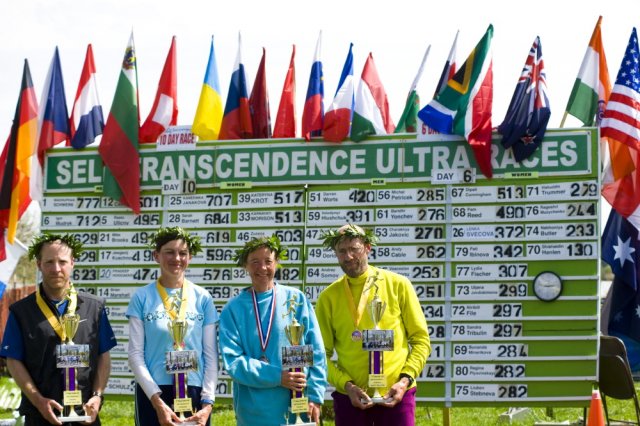
6 and 10 Day Race Winners
In second place was American Pam Reed, 48, who set an American record for her age groups with 490 miles- At her first attempt at a 6 day race.
Darren Worts, 38, USA won for the men with 420 miles
In the Ten Day, Madhupran Wolfgang Schwerk,53,from Germany won with an amazing 777 miles. This was the 3rd longest distance in any 10 day race.
Kaneenika Janakova,38, from Slovakia won the ladies' Ten Day event with 707 miles. A personal best and her second consecutive victory.
There was a field of 44 in the 10 Day and 36 in the Six Day.
Results at Sri Chinmoy Marathon TeamFrom Race Report by Sahishnu.at Marathon Team blog
Race Report at NY Times
Race reports, photos and interviews at Perfection Journey by Utpal
Photo Gallery by Jowan
Welcome to the Sri Chinmoy Centre


Sri Chinmoy Centre
The Sri Chinmoy Centre is both a place for inner self-discovery and outer service to the world. Read more...
Sri Chinmoy
The Centre draws its inspiration from our teacher, Sri Chinmoy, whose life expressed the unbounded potential of the human spirit. Read more...
Meditation
Meditation is a core part of our lives, and the Centre organises free meditation classes in over 50 countries around the world. Read more...
 Sports
All about our races, marathons, and multi-sports events. |
 World Harmony Run
This 80 nation torch relay celebrates oneness and fosters friendship. |
 Members
Meet Members of the Sri Chinmoy Centre. |

More About Sri Chinmoy Centre

Photo Galleries
Photo Galleries by members of the Sri Chinmoy Centres. Including photos from concerts, art exhibitions and travels around the world.

Humanitarian Service
An overview of our efforts to serve in developing countries. Find out about our Oneness Heart Tears and Smiles organisation.

Enterprises
Local enterprises, restaurants, cafes, and shops of Sri Chinmoy Centre.
- ‹ previous
- 168 of 337
- next ›

Except where explicitly stated otherwise, the contents of this site are licensed under a Creative Commons Attribution-NonCommercial-NoDerivs 3.0 Unported License. read more »
SriChinmoyCentre.org is a Vasudeva Server project.